SNS
Overview
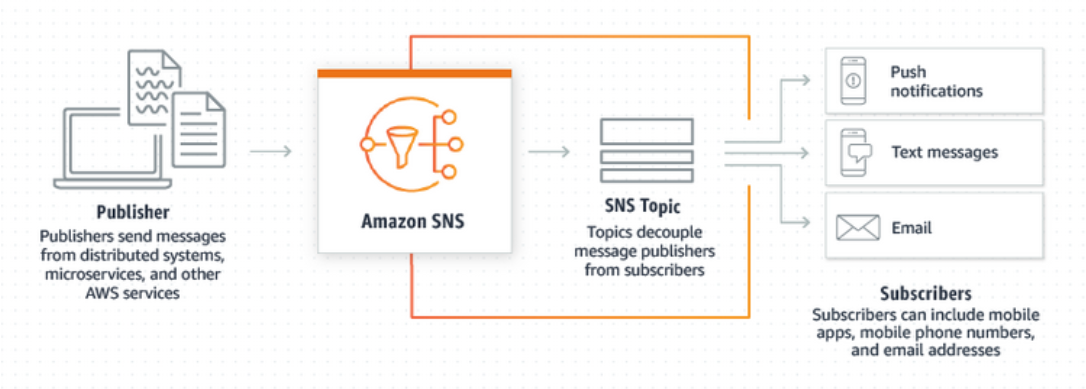
Amazon Simple Notification Service (SNS) helps send alerts like emails, text messages, and push notifications easily.
- Publishers send messages to topics
- Subscribers receive the messages
In SNS, a topic acts as the central channel that connects the publisher and subscribers.
Accessing SNS on AWS
You can use the AWS console to work with SNS.
- Open the AWS Services tab
- Search for “SNS”
- Click on “Simple Notification Service”
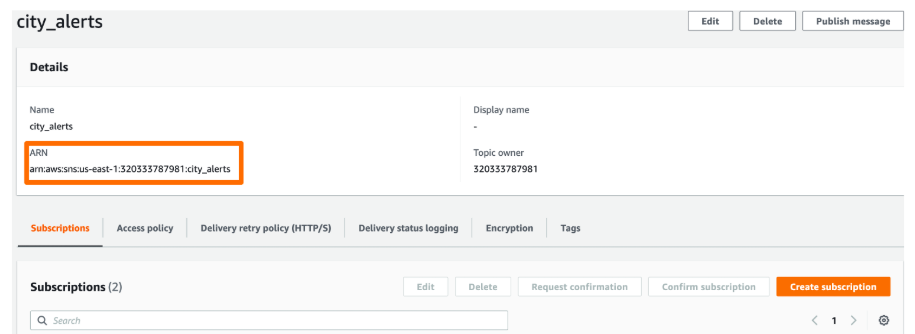
Once opened, you’ll be able to view and manage all topics and subscriptions.
- Topics appear on the left
- Subscriptions are also listed there
- Each topic has a unique ARN (Amazon Resource Name)
This ARN is important as it uniquely identifies your topic when using SNS in code.
SNS Topics
Topic Behavior and Permissions
SNS topics behave predictably when recreated.
- Creating a topic with the same name returns the same ARN
- It doesn’t create duplicates
- IAM permissions must allow SNS access
Creating an SNS Topic
To create a topic:
## create client
import boto3
sns = boto3.client('sns',
                   region_name='us-east-1',
                   aws_access_key_id=AWS_KEY_ID,
                   aws_secret_access_key=AWS_SECRET)

response = sns.create_topic(Name='MyAlerts')
topic_arn = response['TopicArn']
print(topic_arn)
Output example:
arn:aws:sns:us-east-1:123456789012:MyAlerts
NOTE: You can also create the topic using a oneliner:
topic_arn_1 = sns.create_topic(Name='MyAlerts')['TopicArn']
Create Multiple Topics
You can create several topics quickly using a simple loop.
departments = ['trash', 'streets', 'water']

for dept in departments:
    sns.create_topic(Name="{}_general".format(dept))
    sns.create_topic(Name="{}_critical".format(dept))
Listing Existing Topics
You can see all existing SNS topics your user has access to. The response will include all Topic ARNs
response = sns.list_topics()
for topic in response['Topics']:
    print(topic['TopicArn'])
Deleting a Topic
When a topic is no longer needed, it’s best to remove it.
sns.delete_topic(TopicArn=topic_arn)
print("Topic deleted.")
To delete multiple topics, you can loop through a filtered list and delete each topic.
topics = sns.list_topics()['Topics']

for topic in topics:
  # If not marked critical, delete it
  if "critical" not in topic['TopicArn']:
    sns.delete_topic(TopicArn=topic['TopicArn'])
SNS Subscriptions
Subscriptions are how users receive updates from a topic in Amazon SNS.
- Each subscription has a unique ID
- It also includes a protocol such as email or SMS
- The endpoint is the phone number or email where messages are delivered
SNS supports many types of message delivery, including
- Email, for sending notifications to email addresses
- SMS, for sending text messages to mobile numbers
Subscription Details
Each subscription has a few key properties.
- The protocol defines how the message is delivered
- The endpoint is the specific email or phone number
- The status shows if the user has confirmed the subscription
Phone numbers confirm automatically, while email subscriptions require clicking a confirmation link.
Create an SMS Subscription
To create a text message (SMS) subscription using boto3:
import boto3
sns = boto3.client('sns')

response_sms = sns.subscribe(
    TopicArn='arn:aws:sns:us-east-1:123456789012:city_alerts',
    Protocol='sms',
    Endpoint='+15551234567'
)

print(response_sms['SubscriptionArn'])
This returns a SubscriptionArn, which uniquely identifies your subscription.
arn:aws:sns:us-east-1:123456789012:city_alerts:55555555-aaaa-bbbb-cccc-555555555555
Create an Email Subscription
We can also subscribe using an email address instead of a phone number.
- Use the same
subscribe()method - Set the protocol to “email”
- Provide the recipient’s email address as the endpoint
response_email = sns.subscribe(
    TopicArn='arn:aws:sns:us-east-1:123456789012:city_alerts',
    Protocol='email',
    Endpoint='user@example.com'
)

print(response_email['SubscriptionArn'])
At first, the status shows pending confirmation. The recipient must click the link in their email to activate it. Once confirmed, it changes to confirmed and can receive notifications.
Create Multiple Subscriptions
You can add multiple subscribers to a topic at once, which is useful for sending notifications to a group.
# For each email in contacts, create subscription to street_critical
for email in contacts['Email']:
  sns.subscribe(TopicArn = str_critical_arn,
                Protocol = 'email',
                Endpoint = email)

response = sns.list_subscriptions_by_topic(
  TopicArn = str_critical_arn)
subs = pd.DataFrame(response['Subscriptions'])

subs.head()
Output:
                                     SubscriptionArn Owner Protocol               Endpoint                                           TopicArn
0  arn:aws:sns:us-east-1:123456789012:streets_cri...          email            js@fake.com  arn:aws:sns:us-east-1:123456789012:streets_cri...
1  arn:aws:sns:us-east-1:123456789012:streets_cri...          email        whoami@fake.com  arn:aws:sns:us-east-1:123456789012:streets_cri...
2  arn:aws:sns:us-east-1:123456789012:streets_cri...          email         tom@fake.com  arn:aws:sns:us-east-1:123456789012:streets_cri...
3  arn:aws:sns:us-east-1:123456789012:streets_cri...          email  bob@abc.com  arn:aws:sns:us-east-1:123456789012:streets_cri...
4  arn:aws:sns:us-east-1:123456789012:streets_cri...          email     alex@fake.com  arn:aws:sns:us-east-1:123456789012:streets_cri...
List Subscriptions for a Topic
You can list all subscribers connected to a topic.
response = sns.list_subscriptions_by_topic(
    TopicArn='arn:aws:sns:us-east-1:123456789012:city_alerts'
)

for sub in response['Subscriptions']:
    print(sub['Protocol'], sub['Endpoint'], sub['SubscriptionArn'])
The response contains a list of all subscriptions for that topic
email user1@example.com arn:aws:sns:us-east-1:123456789012:city_alerts:11111111-aaaa-bbbb-cccc-111111111111
sms +15551234567 arn:aws:sns:us-east-1:123456789012:city_alerts:22222222-aaaa-bbbb-cccc-222222222222
lambda arn:aws:lambda:us-east-1:123456789012:function:process_alert arn:aws:sns:us-east-1:123456789012:city_alerts:33333333-aaaa-bbbb-cccc-333333333333
List All Subscriptions
You can also view every subscription across all topics.
response = sns.list_subscriptions()

for sub in response['Subscriptions']:
    print(sub['TopicArn'], sub['Protocol'], sub['Endpoint'], sub['SubscriptionArn'])
Output:
arn:aws:sns:us-east-1:123456789012:city_alerts sms +15551234567 arn:aws:sns:us-east-1:123456789012:city_alerts:55555555-aaaa-bbbb-cccc-555555555555
arn:aws:sns:us-east-1:123456789012:weather_updates email user@example.com arn:aws:sns:us-east-1:123456789012:weather_updates:99999999-dddd-eeee-ffff-999999999999
Delete Subscriptions
To stop sending notifications to certain users:
sns.unsubscribe(SubscriptionArn='arn:aws:sns:us-east-1:123456789012:abc123')
print("Subscription removed.")
To delete multiple subscriptions, you can loop through all subscriptions to remove users with a specific protocol.
# List subscriptions for streets_critical topic.
response = sns.list_subscriptions_by_topic(
  TopicArn = str_critical_arn)

# For each subscription, if protocol is SMS, unsubscribe
for sub in response['Subscriptions']:
  if sub['Protocol'] == 'sms':
	  sns.unsubscribe(SubscriptionArn=sub['SubscriptionArn'])

subs = sns.list_subscriptions_by_topic(
  TopicArn=str_critical_arn)['Subscriptions']
Remove Multiple Subscriptions
You can also remove multiple subscriptions at once, for example, all SMS-based ones.
response = sns.list_subscriptions()
for sub in response['Subscriptions']:
    if sub['Protocol'] == 'sms':
        sns.unsubscribe(SubscriptionArn=sub['SubscriptionArn'])
Sending Messages
Sending messages with Amazon SNS is simple and flexible. You can broadcast to many people or send a single text message to one recipient.
- You can publish to a topic
- You can send a single SMS message
- You can also customize each message
Publishing To A Topic
When you publish to a topic, every subscriber connected to that topic receives the message. This method helps distribute one message to many recipients at once.
import boto3
sns = boto3.client('sns')

sns.publish(
    TopicArn='arn:aws:sns:us-east-1:123456789012:weather_alerts',
    Message='Heavy rain expected tomorrow. Stay safe!',
    Subject='Weather Update'
)
Expected result:
{
  'MessageId': 'abcd1234-5678-efgh-ijkl-1234567890ab'
}
Message And Subject
The message body and subject determine what the subscribers receive.
Messageis the main textSubjectappears only in email messages- SMS messages ignore the subject line
This keeps email messages clear and detailed, while SMS messages stay short and direct.
Sending Custom Messages
You can create messages dynamically using variables.
city = "Springfield"
temp = 35

sns.publish(
    TopicArn='arn:aws:sns:us-east-1:123456789012:weather_alerts',
    Message=f"Alert for {city}: Temperature reaching {temp}°C today!"
)
Sending A Single SMS
You can also send one SMS directly to a phone number.
sns.publish(
    PhoneNumber='+15551234567',
    Message='System maintenance scheduled for 10 PM tonight.'
)
Sending direct SMS messages works well for quick, one-time alerts.
- Good for temporary notifications
- Not ideal for repeated or automated use
- Harder to maintain in larger systems
For growing systems, topics make it easier to manage subscribers and updates.
Topic vs Single SMS
There are two main ways to send messages.
-
Publish to a topic
- Reaches multiple subscribers
- Easier to maintain
-
Send a single SMS
- Simple for one recipient
- Great for quick, direct messages