Open Policy Agent
OPA
Open Policy Agent (OPA) is an open-source policy engine that helps enforce policies across your software stack.
- Language-agnostic, integrates with various systems.
- Checks if requests are allowed or denied based on policies
- Uses a declarative language called Rego.
OPA separates decision-making from enforcement: When software needs to make decisions, it queries OPA, sending structured data like JSON as input.
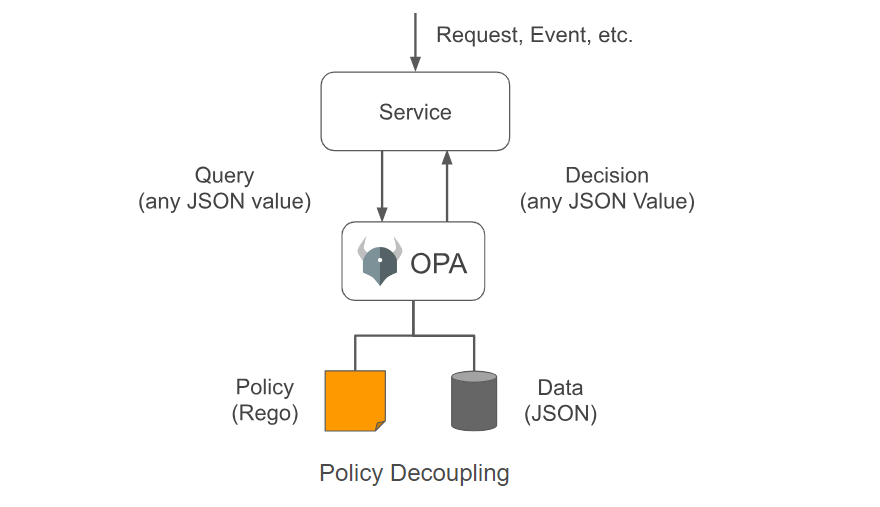
For more information, see Open Policy Agent.
OPA is Authorization
OPA handles authorization, not authentication. Once a user is authenticated, OPA decides what parts of the application the user can access.
- Evaluates access rights based on policies.
- Ensures users only access permitted resources.
OPA Installation
Download the OPA binary and set the permissions:
curl -L -o opa https://openpolicyagent.org/downloads/v0.60.0/opa_linux_amd64_static
chmod 755 ./opa
Run OPA as a server:
./opa run -s

OPA Policy
Here’s a sample policy written in Rego:
### example.rego

package example

default allow := false

allow if {
    count(violation) == 0
}

violation contains server.id if {
    some server
    public_server[server]
    server.protocols[_] == "http"
}

violation contains server.id if {
    server := input.servers[_]
    server.protocols[_] == "telnet"
}
Load the policy via curl:
curl -X PUT --data-binary @example.rego http://localhost:8181/v1/policies/example1
To view existing policies:
curl http://localhost:8181/v1/policies
OPA Gatekeeper
OPA Gatekeeper is an OPA extension for Kubernetes, enabling policy enforcement within clusters using Rego.
- Defines custom resources for policies using CRDs.
- Uses "Constraint Templates" to set policy requirements.
- Integrates with Kubernetes admission control.
OPA Gatekeeper helps admins enforce resource configuration policies in Kubernetes.
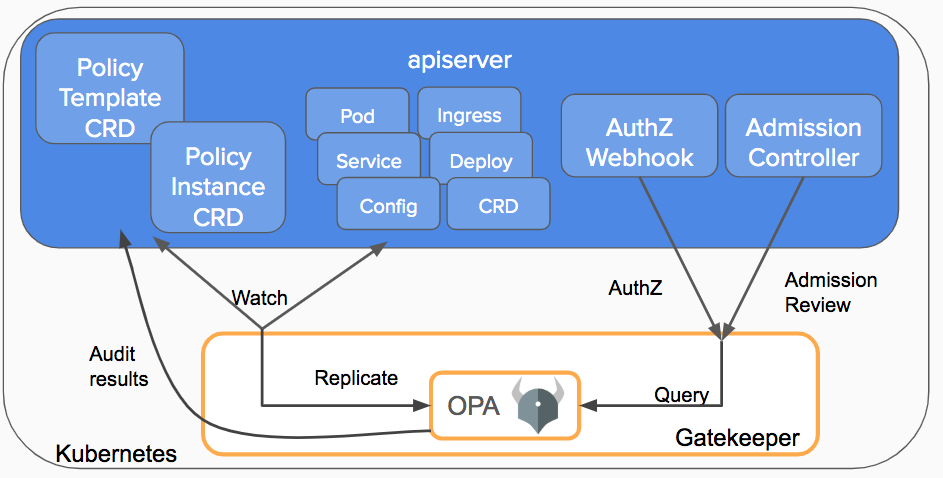
Install OPA Gatekeeper: OPA Gatekeeper documentation.
kubectl apply -f https://raw.githubusercontent.com/open-policy-agent/gatekeeper/v3.14.0/deploy/gatekeeper.yaml
Ensure Gatekeeper services are running.
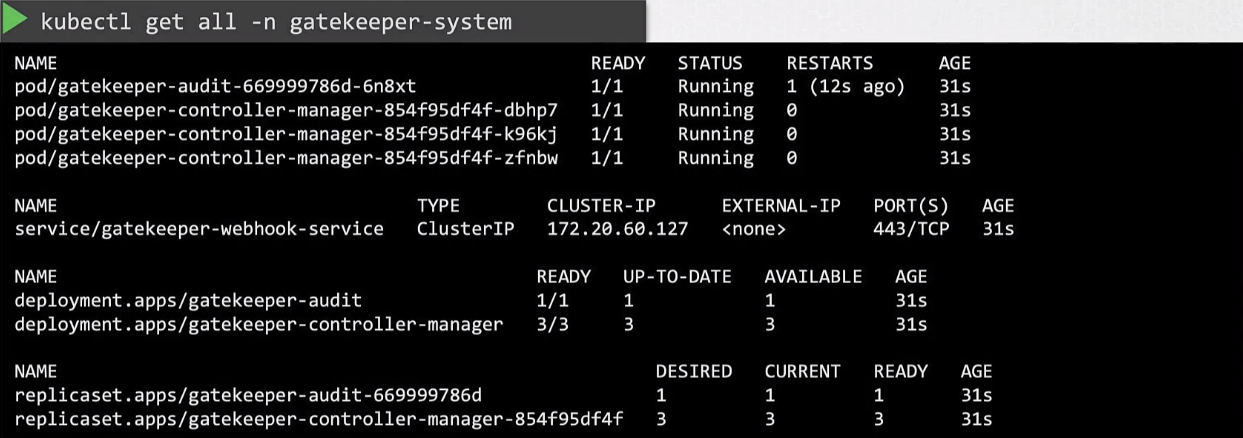
OPA Constraint Framework
The OPA Constraint Framework helps define and implement policies:
- What actions to perform.
- Where to enforce them.
- How to implement the enforcement.
This is defined in the Constraint Template.
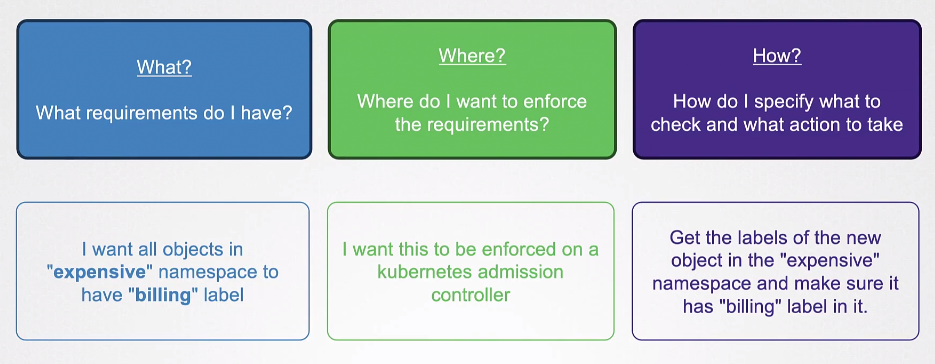
Sample Constraints
These sample constraint define required labels for Kubernetes resources.
## require-label-billing.yaml
apiVersion: templates.gatekeeper.sh/v1
kind: SystemRequiredLabel
metadata:
  name: require-billing-label
spec:
  match:
    namespaces: ["expensive"]
  parameters:
    labels: ["billing"]
## require-label-tech.yaml
apiVersion: templates.gatekeeper.sh/v1
kind: SystemRequiredLabel
metadata:
  name: require-tech-label
spec:
  match:
    namespaces: ["engineering"]
  parameters:
    labels: ["tech"]
Constraint Template
A constraint template defines the logic for applying the policy to resources.
## constraint-template.yaml
apiVersion: templates.gatekeeper.sh/v1
kind: ConstraintTemplate
metadata:
  name: systemrequiredlabels
spec:
  crd:
    spec:
      names:
        kind: SystemRequiredLabel
      validation:
        openAPIV3Schema:
          properties:
            labels:
              type: array
              items:
                type: string
  targets:
    - target: admission.k8s.gatekeeper.sh
      rego: |
        package k8s.admission

        violation[{"msg": msg, "details": {"missing_labels": missing}}] {
            provided := {label | input.request.object.metadata.labels[label]}
            required := {label | input.parameters.labels[_]}
            missing := required - provided
            count(missing) > 0
            msg := sprintf("You must provide labels: %v", [missing])
        }
Apply the manifests:
kubectl apply -f .