Components
This is not an exhaustive documentation of all the existing Azure Services. These are summarized notes for the Azure Certifications.
To see the complete documentation, please go to: Azure documentation
Overview
Azure Load Balancers are composed of several key components that work together to manage incoming network traffic efficiently. These components ensure:
- Effective load balancing of network traffic.
- Optimization of application availability.
- Seamless communication between clients and backend resources.
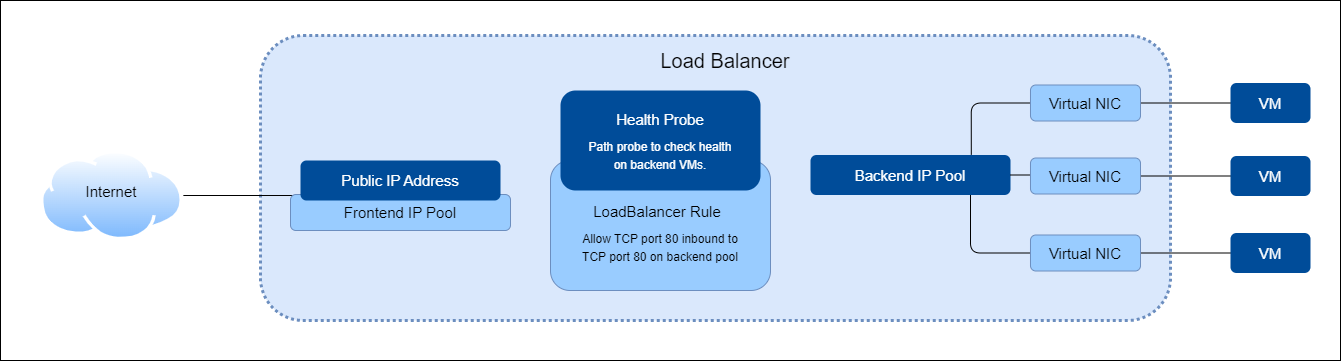
Frontend IP Configuration
This component is the main point of contact for clients accessing the load-balanced application.
- Represents the access point for clients.
- Can be either a private or public IP address, depending on the load balancer type.
- Supports multiple Frontend IP addresses.
Backend Pool
The backend pool handles incoming requests and consists of various VMs or instances.
- A collection of VMs or instances within a scale set designed to manage incoming requests.
- Automatically adjusts when instances are added or removed, ensuring optimal traffic distribution.
Health Probes
Health probes check the status and readiness of the instances in the backend pool.
- Assesses the health of instances and their readiness to handle traffic.
- Identifies which instances are healthy and capable of receiving traffic.
- Prevents traffic from being routed to unhealthy instances.
Load Balancing Rules
These rules define how incoming traffic is distributed across the backend pool.
- Specifies how inbound traffic should be distributed among backend instances.
- Example: A rule for port 80 (HTTP) that routes traffic from the frontend IP to port 80 on backend instances.
High Availability Ports
High availability ports enable protocol-agnostic load balancing for all ports.
- Configures a rule for 'protocol - all and port - 0.'
- Facilitates load balancing for all TCP and UDP flows across all ports of an internal standard load balancer.
Inbound NAT Rules
Inbound NAT rules manage traffic forwarding from specific IP and port combinations to backend instances.
- Forwards traffic with specific frontend IP and port combinations to designated VMs or instances.
- Useful for scenarios like RDP connections to multiple VMs behind a load balancer.
Outbound Rules
Outbound rules handle network address translation for outbound traffic from backend VMs.
- Configures outbound network address translation (NAT) for all VMs within the backend pool.
- Enables outbound communication to the Internet.
- Supported only on the Standard Load Balancer.
- Not available on the Basic Load Balancer.