CI/CD with Jenkins
Overview
CI/CD is a workflow for integrating, testing, packaging, and deploying software changes. It helps teams keep changes small and keeps applications in a deployable state.
For more information, please see CICD Overview page.
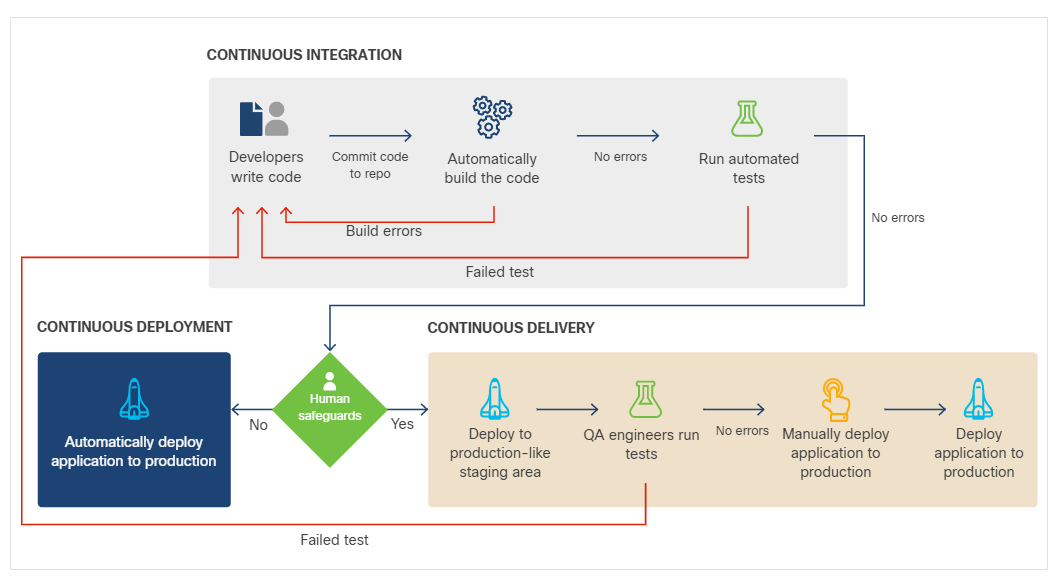
Continuous Integration
Continuous Integration means developers frequently merge small changes into the main code branch. Each change can trigger automated checks.
Common CI tasks include:
- Compiling or building the application.
- Running unit tests.
- Running static code analysis.
- Running integration tests.
- Packaging and versioning artifacts.
- Publishing packages or container images.
Continuous Delivery
Continuous Delivery means the application is kept ready for deployment. A candidate build is deployed to staging, tested, and marked as production-ready when it passes the required gates.
Typical gating tests include:
- Integration tests.
- Security tests.
- Performance tests.
- Scale tests.
- Acceptance tests.
Continuous Deployment
Continuous Deployment automatically deploys every production-ready build. Some teams use this approach, while others require a human approval before production release.
Safer Release Patterns
| Pattern | Description |
|---|---|
| Rolling | Updates instances gradually without requiring users to reinstall. |
| Canary | Sends a small portion of users or traffic to the new version first. |
| Blue-green | Runs old and new environments side by side and switches traffic over. |
Jenkins Job Example
In Jenkins, a simple build job can pull source code from Git and run a shell script.
./buildscript.sh
A second job can test the running application:
if [ "$(curl localhost:8000/test)" = "You are calling me from 172.17.0.1" ]; then
   exit 0
else
   exit 1
fi
The test exits with 0 when the app returns the expected response and exits with 1 when the check fails.
Jenkins Pipeline Example
A Jenkins pipeline can combine preparation, build, and test stages.
node {
   stage('Preparation') {
       catchError(buildResult: 'SUCCESS') {
          sh 'sudo docker stop runningsample'
          sh 'sudo docker rm runningsample'
       }
   }
   stage('Build') {
       build 'BuildAppJob'
   }
   stage('Results') {
       build 'TestAppJob'
   }
}
The preparation stage removes an existing container if it exists. The build stage runs the application build job, and the results stage runs the test job.
Benefits
- Smaller change sets are easier to review and troubleshoot.
- Automated tests catch problems earlier.
- Deployment becomes more predictable.
- Canary and blue-green strategies reduce user impact.
- Teams can release features incrementally.