Deployment
Overview
OpenStack can be installed in many ways depending on your goals, from full production deployments to small lab setups. Each method has its pros and cons.
-
Manual installation
- Detailed and provides full control
- Time-consuming but teaches inner workings of OpenStack
-
Automated deployments
- Simplifies deployment
- Reduce errors and save time
- Suitable for production environments
Vendor tools provide graphical interfaces, professional support, and advanced automation, which makes them well suited for production deployments.
Manual Installation
Manual installation requires careful planning and multiple steps across nodes.
-
You need to plan for the following:
- Number of control, compute, and storage nodes
- High availability setup
- Network and storage configuration
-
After planning, the next steps are:
- Configure physical networking
- Install the OS on each node
-
Deploy the infrastructure components:
- Network and protocol software, web servers
- SQL database with clustering if needed
- Message queues and caching services
- Additional components like Etcd for newer releases
-
Once the infrastructure is ready, OpenStack services are installed:
- Keystone (identity service) first
- Then image, compute, network, and block storage services
- Horizon dashboard for easier management
-
Final configuration and validation is performed:
- Configure service
.conf/.inifiles - Set database, message queue, and authentication details
- Populate service databases and start services
- Verify services and basic functionality
- Configure service
Automated Deployment Tools
Automated tools use scripts, containers, or orchestration to simplify OpenStack installation.
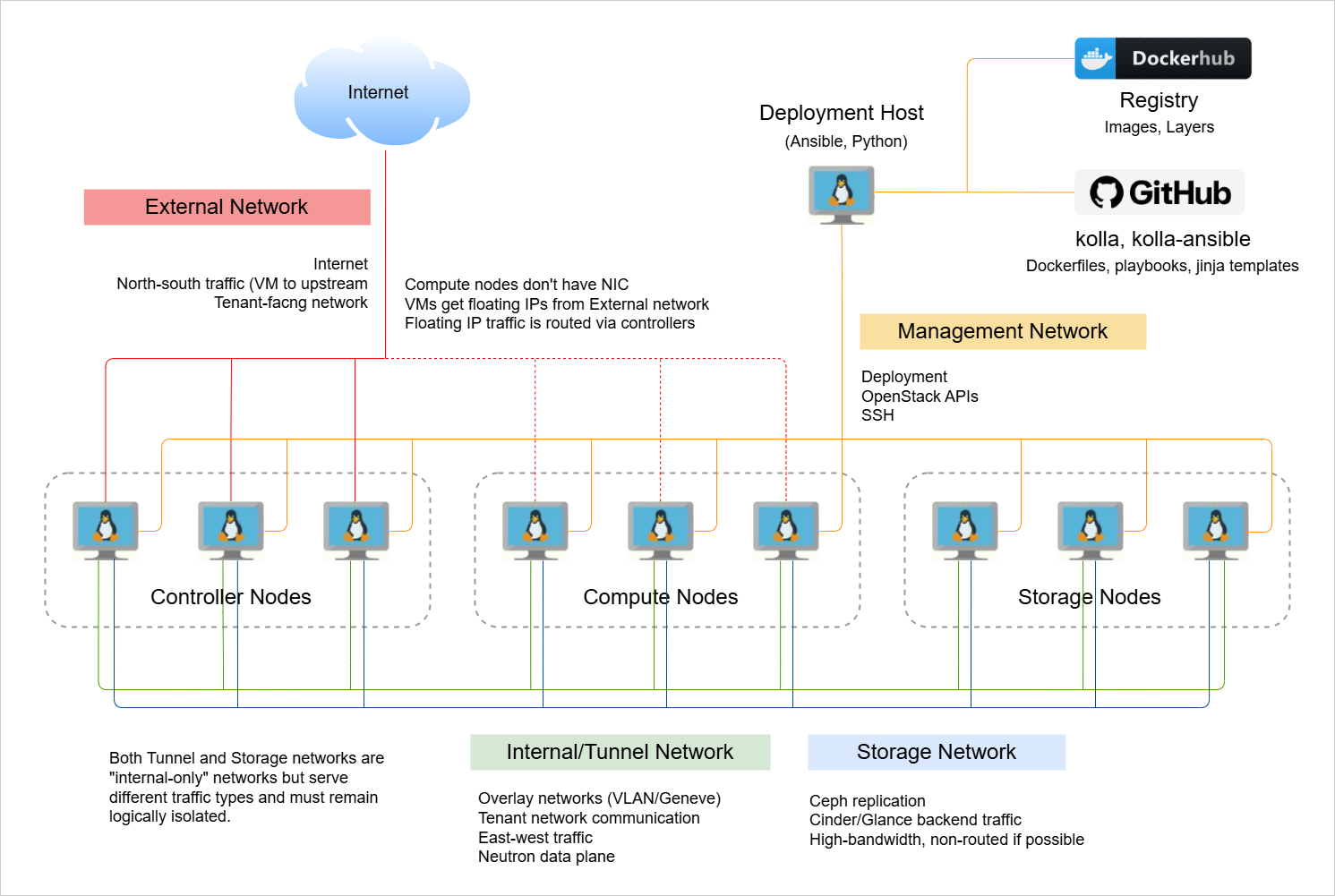
Kolla
Kolla packages OpenStack services in Docker containers and provides scripts for deployment:
-
Kolla-Ansible
- Services runs on Docker runtime, installed on Linux
- Uses Ansible playbooks for service provisioning
- Includes features like HAProxy to loadbalance API traffic
- Uses Galera for SQL database high availability
-
Kolla Kubernetes
- Services runs containers in Kubernetes
- Uses Ansible to configure services
- Uses Helm for orchestration
You need basic knowledge of Docker and Ansible for operations, but initial deployment is straightforward.
OpenStack Ansible
OpenStack Ansible installs many services in Linux containers (LXC) or systemd units:
- Uses Ansible roles for installing optional services
- Comes with reasonable default configurations
- Provides extensive operations and troubleshooting guides
Workflow:
-
Prepare deployment host with Ansible:
- Install software
- Clone the OSA repo
-
Configure target nodes, network, storage, and SSH:
- Install software
- Configure SSH
- Configure network and storage settings
-
Edit OpenStack Ansible configuration files:
- Add or remove OpenStack services
- Configure credentials
-
Run scripts to deploy services:
setup_hosts.ymlsetup_infrastructure.ymlsetup_openstack.yml
-
Verify the OpenStack deployment:
- List LXC containers
- Run CLI commands inside the utility containers
- Login to Horizon
OpenStack-on-OpenStack (OOO)
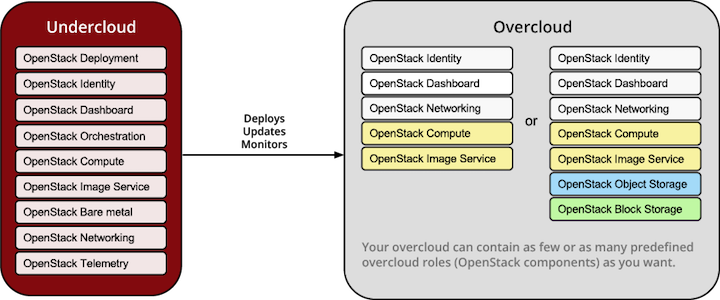
OpenStack-on-OpenStack uses a small “undercloud” OpenStack to provision the main OpenStack (“overcloud”) nodes:
- Undercloud runs bare metal service (Ironic)
- Overcloud nodes are deployed via orchestration templates
- Adding or upgrading nodes is simplified using Ironic and orchestration
This approach is production-ready and simplifies scaling and upgrades.
Development and POC Deployments
For learning or proof-of-concept deployments, the following lightweight tools are available:
-
DevStack
- Installs OpenStack quickly from source
- Supports single-node or multi-node setups
- Ideal for experimentation
-
Packstack
- Red Hat community tool
- Easy installation on RHEL, CentOS, Fedora
- Supports adding compute nodes to single-node setups
These tools allow you to explore OpenStack features without heavy infrastructure.