Starter Notes
Overview
GitHub Actions (GHA) automates software workflows like building, testing, and deploying code.
- Built-in CI/CD system in GitHub
- Automates repetitive development tasks
- Runs directly inside GitHub repositories
Just like a car assembly line has workers performing tasks step by step, GHA automates software development in an organized flow.
GHA Components
Event
An event is what triggers a workflow in GitHub Actions.
- Happens when someone pushes code, opens a pull request, or creates an issue
- Can also be triggered manually or on a schedule
on: push # Triggers workflow when code is pushed
Workflow
A workflow is a set of automated tasks defined in a YAML file.
- Stored in
.github/workflows/ - Can contain multiple jobs
- Runs when triggered by an event
Example: A workflow to test and deploy code:
name: CI Workflow
on: push
jobs:
  test:
    runs-on: ubuntu-latest
    steps:
      - uses: actions/checkout@v3
      - run: echo "Running tests"
Steps and Actions
A step is an individual task within a job. An action is a reusable task inside a step.
- Steps execute in order within a job
- Actions simplify complex tasks (e.g., checking out code)
Example: Running a script after checking out code:
steps:
  - uses: actions/checkout@v3  # Action to get the code
  - run: python script.py       # Step to run the script
Jobs and Runners
A job is a collection of steps, and a runner is the machine that executes them.
- Jobs run independently, but dependencies can be set
- Runners can be Linux, macOS, or Windows
Example: Two jobs running in parallel:
jobs:
  build:
    runs-on: ubuntu-latest
    steps:
      - run: echo "Building the app"
  test:
    runs-on: ubuntu-latest
    steps:
      - run: echo "Testing the app"
A Simple GHA Workflow
A push event triggers a workflow with a job that runs on Ubuntu.
- Step 1: Checkout repository
- Step 2: Run a Python script
Example:
name: Simple Workflow
on: push
jobs:
  example-job:
    runs-on: ubuntu-latest
    steps:
      - uses: actions/checkout@v3
      - run: python script.py
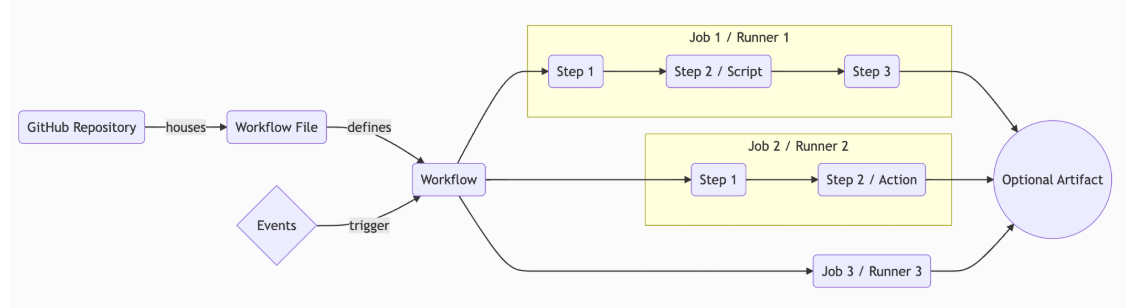
Putting It All Together
A GitHub Actions workflow consists of:
- Events (trigger the workflow)
- Workflows (contain jobs)
- Jobs (contain steps)
- Steps (run scripts or actions)
- Runners (execute jobs)
An example flow:
- A push triggers a workflow
- The workflow runs jobs in parallel
- Jobs contain steps like scripts or actions
- Outputs (artifacts) can be generated if needed
Multiline Strings in YAML
YAML supports multiline strings using block scalar formats. These formats help keep line breaks and indentation intact, making them useful for configurations, logs, and CI/CD scripts.
- Two styles: Literal (|) and Folded (>)
- Three chomping indicators: Clip (default), Strip (-), Keep (+)
For more information, please see YAML data format.