Wireless Infrastructure Security
Securing WAPs
Wireless access points (WAPs) extend a wireless network's coverage by broadcasting a signal from a wired connection. For more information, please see WAPs.
To keep WAPs secure:
- Use strong encryption like WPA3.
- Keep firmware updated to fix known issues.
- Set unique, strong passwords and disable default settings.
- Enable MAC filtering to control which devices can connect.
- Watch network traffic for anything unusual.
- Place WAPs where they’re harder to access physically.
WAP Placement
The positioning of the WAPs will significantly impact the range, coverage, and signal strength of your organization's wireless network.
- Put WAPs in central locations for better coverage and fewer dead spots.
- Avoid placing them near outside walls to limit signal leaking outside.
- Use wall-mounted directional antennas to broadcast signal inward only.
- Mount WAPs high up to reduce the risk of tampering.
- Use tools to measure signal strength and find the best spots.
- Make sure high-use areas have enough coverage.
- Stay clear of interference from things like microwaves or other electronics.
WAP placement requires coordination with:
- Technology team for optimal coverage and performance.
- Cybersecurity team to reduce risks like signal leakage outside the building that could be - exploited.
- Physical security team to prevent unauthorized physical access or tampering with access points.
ESS Configuration
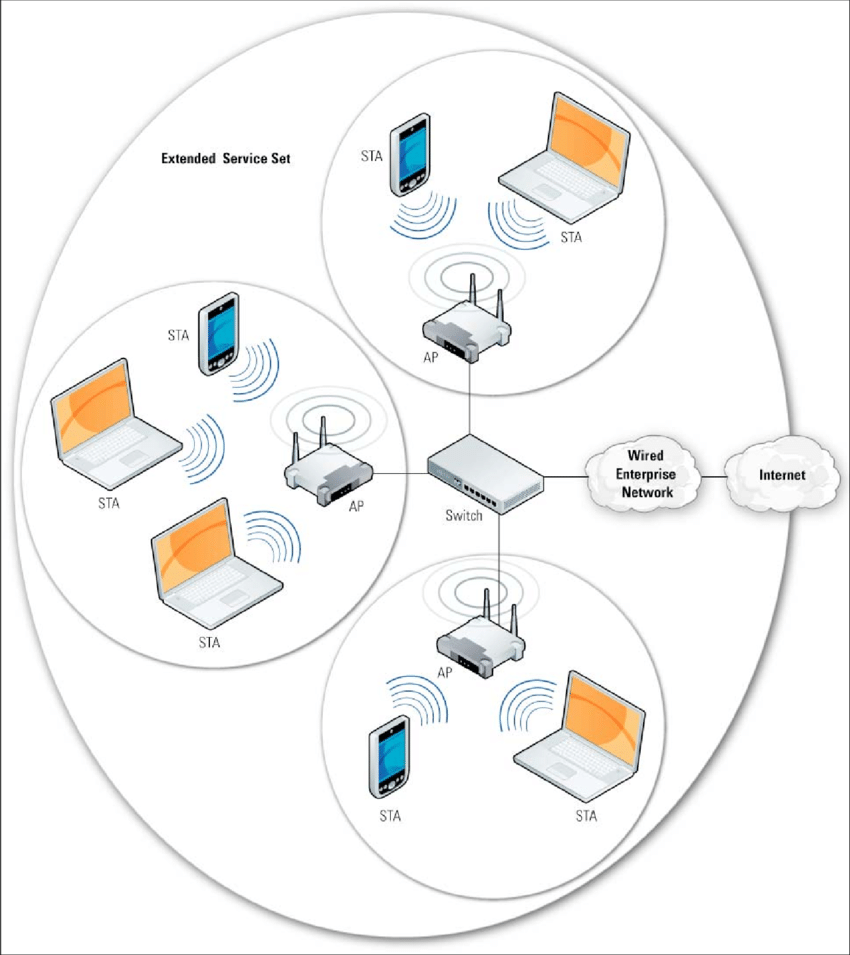
An Extended Service Set (ESS) configuration extends wireless coverage by interconnecting multiple wireless access points (WAPs) to provide seamless connectivity across a larger area. Proper configuration ensures efficient network performance and robust security.
-
SSID Management
- Use a consistent SSID for all access points to enable seamless roaming.
- Hide SSID broadcast to enhance security.
-
Channel Assignment
- Configure non-overlapping channels to minimize interference.
- Utilize automatic channel selection features if available.
-
Security Settings
- Apply strong encryption methods (WPA3) across all access points.
- Implement consistent security policies and access controls.
-
Load Balancing
- Distribute client connections evenly across access points to prevent overload.
- Adjust power settings to manage coverage and client distribution.
-
Roaming Optimization
- Enable fast roaming protocols (802.11r) to improve client handoff between access points.
- Configure access points to support seamless transition without connection drops.
-
Monitoring and Maintenance
- Regularly monitor network performance and signal strength.
- Schedule periodic maintenance and firmware updates for all access points.
Sample diagram of an ESS Configuration with three access points.
Interference Considerations
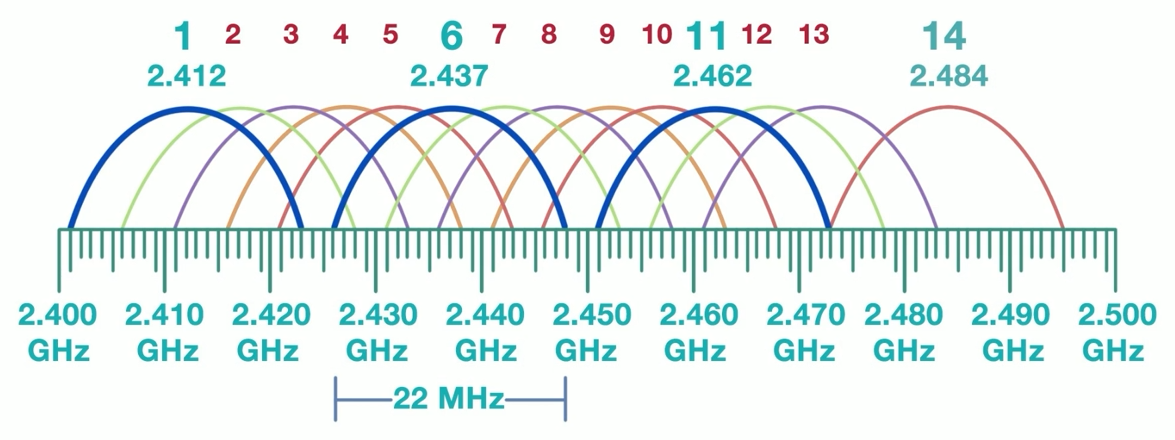
When deploying multiple wireless access points in an ESS configuration, interference must be carefully managed. Interference can degrade signal quality and reduce network efficiency, and there are only a limited number of channels that most wireless access points can use.
-
Co-Channel Interference
- Multiple WAPs in the same area, operate on the same channel or frequency bands
- Reduces overall network throughput as devices contend for the same channel.
- Signals between WAPs collide, requiring the data to be re-transmitted.
- Re-transmission of data slows down the network since additional traffic is added.
- Mitigate by using proper channel planning and spacing out access points.
-
Adjacent Channel Interference
- Happens when access points operate on overlapping channels.
- Causes signal overlap and interference, reducing network performance.
- Avoid by selecting non-overlapping channels (e.g., 1, 6, 11 in the 2.4 GHz band).
Site Survey
Conducting a site survey is important for optimizing the placement and configuration of wireless access points. It helps identify potential interference sources, assess signal strength, and ensure comprehensive coverage.
- Evaluate physical environment and identify obstacles.
- Measure existing signal strength and coverage areas.
- Identify sources of potential interference (e.g., microwaves, neighboring networks).
- Determine optimal locations for access points.
Heat Map
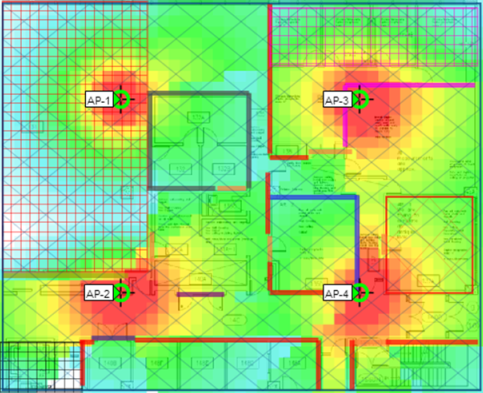
A heat map visually represents the signal strength and coverage of wireless access points within a specific area. It is an invaluable tool for planning and optimizing wireless networks.
- Displays areas of strong and weak signal coverage.
- Highlights potential dead zones and areas needing improvement.
- Assists in identifying interference sources and their impact on coverage.
- Aids in optimal placement of access points for maximum coverage and performance.
- Provides a clear visual aid for stakeholders to understand network performance.
Sample heat map:
Wi-Fi Discovery and Mapping
Wi-Fi discovery and mapping involve techniques used to locate and document the presence and details of Wi-Fi networks. These methods can range from ground-based activities to aerial searches, each serving different purposes and scales of mapping.
-
War-chalking
- Involves marking public spaces to indicate the presence of Wi-Fi networks.
- Symbols are often drawn with chalk on sidewalks, walls, or other visible surfaces.
- The symbols convey information about the network's availability and security.
- It helps others locate and understand the types of Wi-Fi networks in the area.
-
War-driving
- Searching for Wi-Fi networks by driving around in a vehicle equipped with a Wi-Fi-enabled device.
- The goal is to map out the locations and details of wireless networks.
- A laptop, smartphone, or other device with Wi-Fi capability is used.
- The device typically runs software that detects and logs Wi-Fi network details.
- The gathered data can include SSIDs, signal strength, and security types.
-
War-flying
- Similar to war-driving but involves searching for Wi-Fi networks from an aircraft.
- This method can cover larger areas more quickly than ground-based methods.
- Networks are detected and logged as the aircraft flies over different areas, e.g. drones.
- Allows for mapping of Wi-Fi networks over extensive regions, e.g. remote, less accessible areas.