Database Views
Overview
Database views are virtual tables derived from existing data in a database. Unlike physical tables, views don't store data in memory; instead, they store a query that fetches data dynamically from the underlying tables.
- Only the query is stored, not the data of the view
- Once view is created, it can be queried just like a database.
- Useful for simplifying complex queries.
- Provides a layer of abstraction without altering the database schema.
- No need to retype common queries or alter schemas.
Creating a View
Creating a view is straightforward. You write the query you want and add a line to define the view's name.
CREATE VIEW name_of_view AS

SELECT
    column_1,
    column_2
FROM table_name
WHERE condition;
In the sample database below, we have the dim_book_sf table which contains the book titles, their authors, and genre.
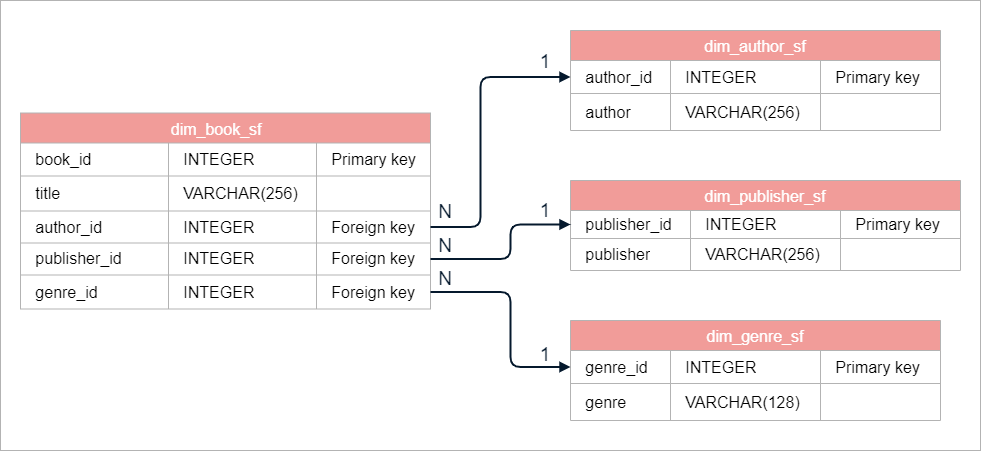
We can analyze the science fiction genre. To achieve this, we can create a view that focuses on science fiction books and their authors.
CREATE VIEW scifi_books AS
SELECT
    title,
    author,
    genre
FROM dim_book_sf
    JOIN dim_author_sf ON dim_author_sf.author_id = dim_book_sf.author_id
    JOIN dim_genre_sf ON dim_genre_sf.genre_id = dim_book_sf.genre_id
WHERE dim_genre_sf.genre = 'science fiction';
Querying the View
After creating the view scifi_books, we can query it like a database:
SELECT * FROM scifi_books;
This view isn't a real table stored in memory. When you query it, the underlying SQL statement is executed to fetch the data.
Managing Views
It's essential to keep track of views in your database. In PostgreSQL, you can query the INFORMATION_SCHEMA.views table to list all views.
SELECT * FROM INFORMATION_SCHEMA.views;
This command is specific to PostgreSQL. For other DBMS, check the documentation to find the equivalent command.
If you run the command above, you will get a long list of views. That's because DBMS's have their own built-in views. To filter out system views, exclude those from pg_catalog and information_schema.
SELECT *
FROM INFORMATION_SCHEMA.views
WHERE table_schema NOT IN ('pg_catalog', 'information_schema');
The output would look something like this:

Benefits of Using Views
Views offer several advantages:
- Minimal Storage: Views only store the query, saving space.
- Access Control: Limit user access to specific data without exposing sensitive information.
- Simplified Queries: Abstract complex joins and operations, especially in normalized databases, making it easier for users to work with the data.
Example: Database View
We will use a database of Pitchfork reviews sourced from Kaggle. Pitchfork is a music magazine known for publishing reviews.
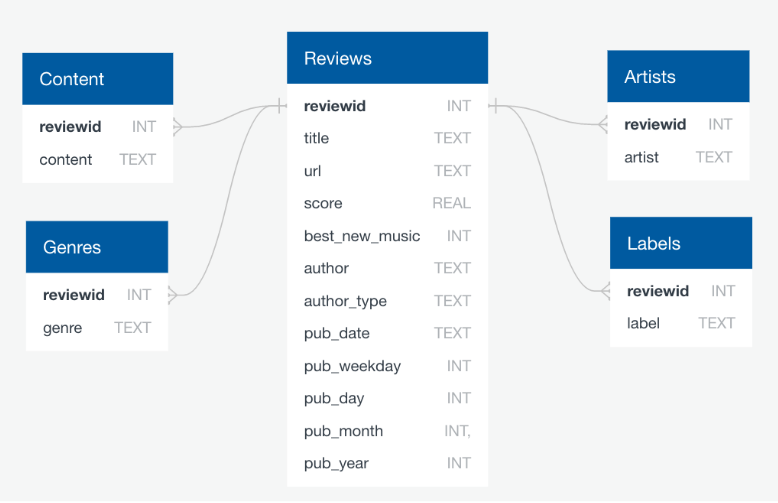
The database schema includes a main table named Reviews, which contains:
- URL of the review
- The title of the work being reviewed
- score.
- Details about the author and the publication date.
The reviewid field acts as a foreign key linking to several other tables:
contentgenresartistlabels
The content table holds the text of the review.
Reference: https://www.kaggle.com/nolanbconaway/pitchfork-data
Create the View
Create a view called high_scores that holds reviews with scores above a 9.
-- Create a view for reviews with a score above 9
CREATE VIEW high_scores AS
SELECT *
FROM reviews
WHERE score > 9;
Count the number of records in high_scores that are self-released in the label field of the labels table.
SELECT COUNT(*)
FROM labels
INNER JOIN high_scores ON high_scores.reviewid = labels.reviewid
WHERE label = 'self-released';
