GitOps vs. DevOps
Problems in DevOps Workflow
-
Manual Configuration & Execution
- Team members manually executed scripts on their machines.
- No centralized automation for provisioning infrastructure.
-
Lack of Version Control & Reviews
- All configurations were stored in a single Git branch.
- No code reviews or automated tests for validation.
-
Security Risks
- Push-based CI/CD required exposing credentials.
- Manual CLI changes led to potential security issues.
-
Configuration Drift
- Changes made outside of Git (via CLI) caused inconsistencies.
- Difficult to track modifications in case of failures.
-
Disaster Recovery Issues
- Infrastructure recovery relied on outdated Git configurations.
- Manual changes weren’t logged, making recovery time-consuming.
Example: Push-Based CI/CD Issues
# Kubernetes Deployment Config (Example)
apiVersion: apps/v1
kind: Deployment
metadata:
  name: my-app
spec:
  replicas: 3
  template:
    spec:
      containers:
        - name: app
          image: my-app:v1
If this deployment is modified directly in Kubernetes (kubectl apply), Git won’t reflect the actual state. Over time, this leads to configuration drift and uncertain rollback procedures.
Enter GitOps
GitOps solves these problems by:
- Keeping the entire infrastructure and app state in Git
- Automating deployments based on Git changes
- Ensuring the actual cluster state always matches Git
With GitOps, teams can recover infrastructure faster, track all changes, and improve security.
What is GitOps?
GitOps is a framework that uses Git as the single source of truth for infrastructure and application deployments. It automates updates, ensures consistency, and enables rollbacks.
-
Version Control with Git
- All infrastructure and application configurations are stored in Git.
- Changes are made in feature branches before merging into the main repository.
-
Continuous Integration (CI)
- New code is automatically built and tested.
- Changes are reviewed and merged into the central repository.
-
Continuous Deployment (CD)
- Changes are automatically deployed to the cluster.
- A GitOps operator ensures the actual state matches the desired state in Git.
Example: GitOps Workflow
-
Developer Updates Code
-
A developer updates a Kubernetes deployment file.
apiVersion: apps/v1kind: Deploymentmetadata:name: my-appspec:replicas: 3template:spec:containers:- name: appimage: my-app:v2
-
-
GitOps Operator Detects Changes
- It compares the Git repository with the cluster state.
- If there’s a difference, it applies the update.
-
Automatic Rollback (If Needed)
- If the update causes issues, a simple
git revertcommand restores the previous version.
git revert HEADgit push origin main- The GitOps operator detects the rollback and restores the cluster state.
- If the update causes issues, a simple
GitOps Principles
GitOps follows four key principles to automate deployments and maintain system consistency.
-
Declarative Over Imperative
- Everything is defined declaratively.
- This includes infrastructure and applications.
- Imperative approach (relies on direct commands) is discouraged.
- Storing system states ensures easy reconciliation and consistency.
-
Git as the Source of Truth
- All configuration files are stored in a Git repository.
- Version control ensures immutability and traceability.
- Changes to the system must be recorded in Git before applying.
-
Automation with GitOps Operators
- Software agents pull the desired state from Git.
- Changes are applied automatically to one or more clusters.
- Operators can push updates to multiple environments.
-
Continuous Reconciliation
-
The system continuously monitors and fixes drift.
-
The process follows three steps:
- Observe - Detects changes in Git.
- Diff - Compares the Git state with the cluster.
- Act - Applies changes to match the desired state.
-
Example: GitOps Operator in Action
-
Declare the desired state in Git
apiVersion: apps/v1kind: Deploymentmetadata:name: my-appspec:replicas: 2 -
Operator detects drift and reconciles
git commit -m "Increase replicas to 3"git push origin main -
Cluster updates automatically
- The GitOps operator applies the changes, ensuring the system is always in sync.
GitOps vs. DevOps
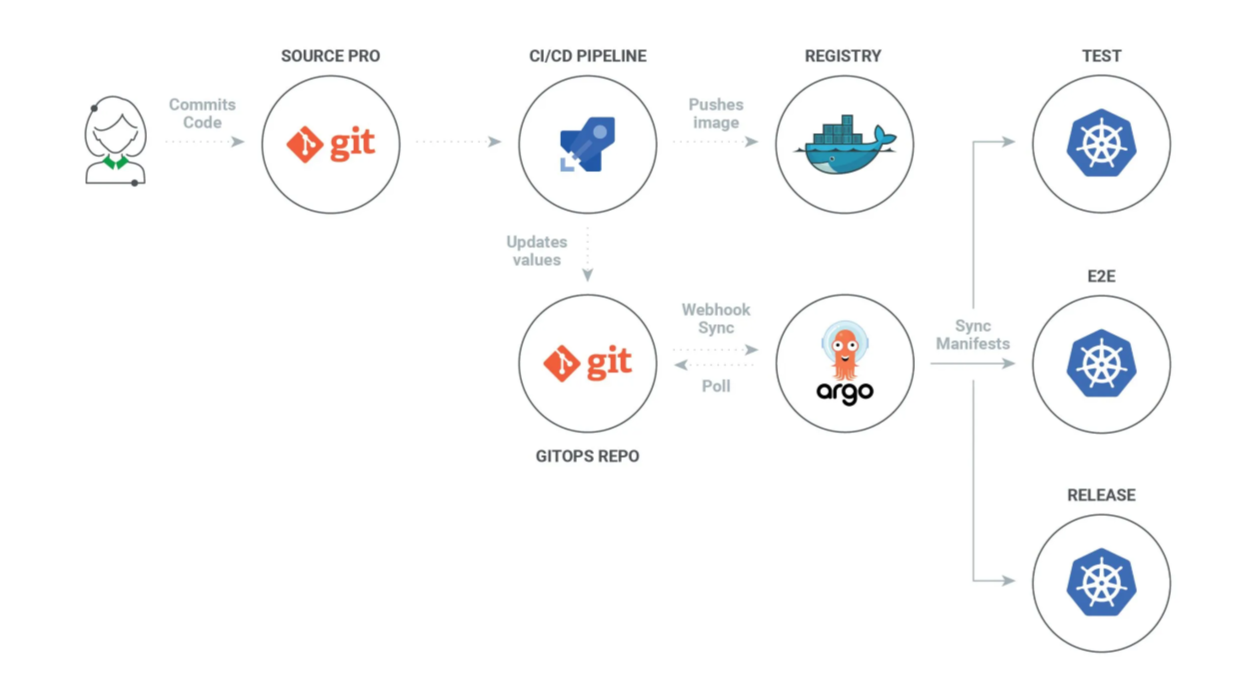
GitOps and DevOps share similar goals but have key differences. DevOps works for any application, while GitOps is mainly used with Kubernetes and containerized environments.
- DevOps ➔ Push changes to the cluster
- GitOps ➔ Operator pulls changes from Git
DevOps and GitOps Workflows
-
DevOps Workflow
- Developers write and commit code.
- CI builds, tests, and creates artifacts.
- The image is published to a container registry.
- CD applies kubectl commands to update clusters.
kubectl apply -f deployment.yaml -
GitOps Workflow
-
Uses two Git repositories:
- One for application code.
- One for Kubernetes manifests.
-
CI process remains the same until publishing the image.
-
The manifest repo is updated with the new image.
-
A pull request (PR) is raised and reviewed.
-
Once merged, the GitOps operator pulls changes and syncs the cluster.
-