AWS Billing
Overview
AWS billing separates costs by the services you use. Some companies may want to offer flexible pricing to their customers, like pay-as-you-go, which is not shown by default in AWS invoices. Cost allocation tags can be used to set this up.
- Billing shows charges per AWS service
- Pay-as-you-go not included in default invoice
- Cost allocation tags make flexible billing possible
Using tags makes it easier to design custom billing models for customers.
Cost Allocation Tags
Tags are labels that help organize and track resources.
- Each tag has a key and a value
- Keys can hold more than one value
- Tags can be used for cost allocation
For example, adding a tag like app-username makes it possible to track usage for each user. This way, costs are easier to connect to the right resources.
Adding Tags to Files
Once cost allocation tags are enabled, they can be added in different ways.
- Create separate S3 buckets per user and tag them
- Keep one bucket and tag each file individually
- Tags appear in object properties
aws s3api put-object-tagging \
  --bucket mybucket \
  --key data/file1.txt \
  --tagging 'TagSet=[{Key=app-username,Value=alice}]'
Expected result: The file now has a tag app-username=alice stored in its properties.
These tags allow AWS Cost and Usage Reports to generate detailed usage per user or per department, making analysis easier.
AWS Organization
Organizations help track spending across different teams.
- Manage accounts like development, test, and production
- Combine costs across multiple accounts
- Share discounts across the organization
This makes it possible for each team to manage its budget while still benefiting from shared savings.
AWS Health
AWS Health monitors service availability and disruptions.
- Provides real-time alerts
- Shows issues affecting your resources
- Helps resolve problems before opening a support case
It is a proactive tool to stay ahead of possible service impacts.
AWS Support Options
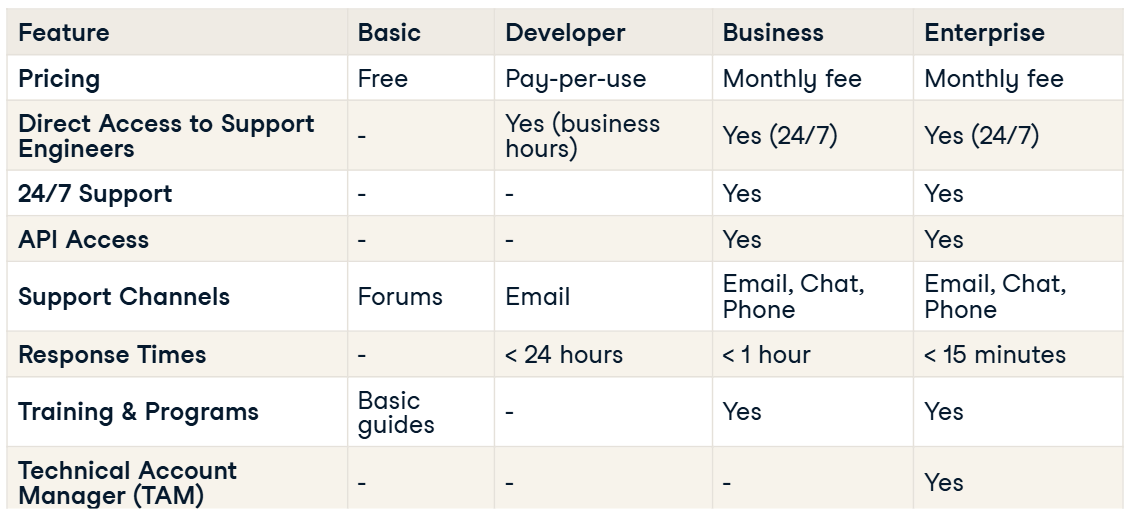
AWS offers different support plans based on needs.
- Basic plan is free with forum access
- Developer, Business, and Enterprise plans have fees
- Business and Enterprise plans provide 24/7 support
- Higher plans include training and faster response times
Developer: < 24 hours
Business: < 1 hour
Enterprise: < 15 minutes
The Enterprise plan also includes a Technical Account Manager for dedicated help. Choosing the right plan ensures the right level of support and faster problem resolution.