AWS CodeDeploy
This is not an exhaustive documentation of all the existing AWS Services. These are summarized notes that I used for the AWS Certifications.
To see the complete documentation, please go to: AWS documentation
Overview
AWS CodeDeploy is a fully managed deployment service that automates software deployments to various compute services, such as Amazon Elastic Compute Cloud (EC2), Amazon Elastic Container Service (ECS), AWS Lambda, and your on-premises servers. Use CodeDeploy to automate software deployments, eliminating the need for error-prone manual operations.
-
Deploy our application automatically to multiple EC2 instances.
-
These instances are not managed by Elastic Beanstalk.
-
There are several ways to handle deployments using open source tools (Ansible, Terraform, Chef, Puppet, etc...).
-
CodeDeploy is the alternative to these tools.
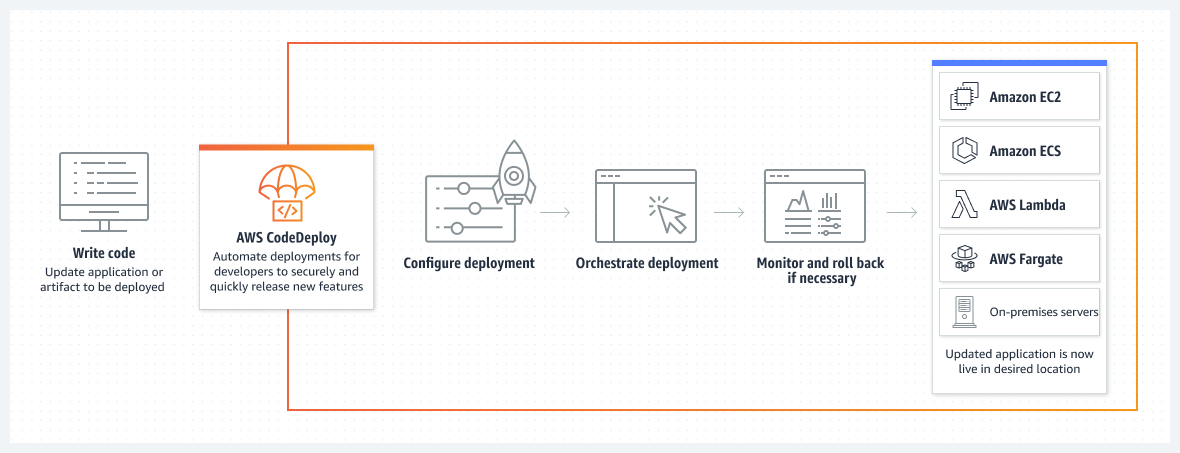
How it works
- Each EC2 Machine (or On Premise machine) must be running the CodeDeploy Agent.
- The agent is continuously polling AWS CodeDeploy for work to do.
- CodeDeploy sends appspec.yml file.
- Application is pulled from GitHub or S3.
- EC2 will run the deployment instructions.
- CodeDeploy Agent will report of success/failure of deployment on the instance.
Additional information
- EC2 instances are grouped by deployment group (dev/test/prod).
- Lots of flexibility to define any kind of deployments.
- CodeDeploy can be chained into CodePipeline and use artifacts from there.
- CodeDeploy can re-use existing setup tools, works with any application, auto scaling integration.
- Note: Blue / Green only works with EC2 instances (not on premise).
- Support for AWS Lambda deployments (we’ll see this later).
- CodeDeploy does not provision resources.
Primary Components
- Application: unique name
- Compute platform: EC2/On-Premise or Lambda.
- Deployment configuration: Deployment rules for success / failures.
- EC2/On-Premise: we can specify the minimum number of healthy instances for the deployment.
- AWS Lambda: specify how traffic is routed to our updated Lambda function versions.
- Deployment group: group of tagged instances (allows to deploy gradually).
- Deployment type: In-place deployment or Blue/green deployment:
- IAM instance profile: need to give EC2 the permissions to pull from S3 / GitHub.
- Application Revision: application code + appspec.yml file.
- Service role: Role for CodeDeploy to perform what it needs.
- Target revision: Target deployment application version.
CodeDeploy AppSpec
- File section: how to source and copy from S3 / GitHub to filesystem
- Hooks: set of instructions to do to deploy the new version (hooks can have timeouts).The order is:
- ApplicationStop
- DownloadBundle
- BeforeInstall
- Install
- AfterInstall
- ApplicationStart
- ValidateService: really important
- BeforeAllowTraffic
- AllowTraffic
- AfterAllowTraffic
Deployment Config
-
Configs
- One a time: one instance at a time, one instance fails => deployment stops.
- Half at a time: 50%
- All at once: quick but no healthy host, downtime. Good for dev.
- Custom: min healthy host = 75%
-
Failures
- Instances stay in “failed state”.
- New deployments will first be deployed to “failed state” instances.
- To rollback: redeploy old deployment or enable automated rollback for failures.
-
Deployment Targets
- Set of EC2 instances with tags.
- Directly to an ASG.
- Mix of ASG / Tags so we can build deployment segments.
- Customization in scripts with DEPLOYMENT_GROUP_NAME environment variables.
Deployment types
-
In place deployment
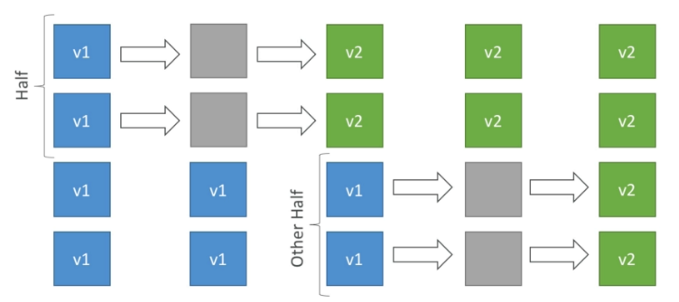
-
Blue / Green Deployment
- Attached to one auto scaling group of instances.
- New auto scaling group of instances created (green).
- If it passes the health checks, version 1 (original asg) is deleted (blue).
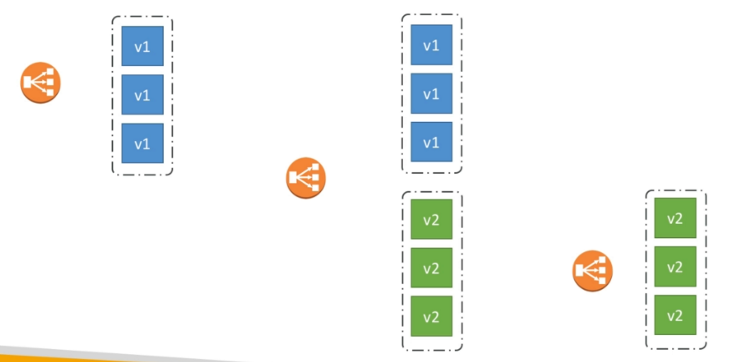
CodeDeploy to EC2
- We define how to deploy the application using appspec.yml + deployment strategy.
- CodeDeploy will do in-place updates to EC2 our fleet of instances.
- We can use hooks to verify the deployment after each deployment phase.
CodeDeploy to ASG
-
In place updates
- CodeDeploy updates the current EC2 instances.
- Instances newly created by ASG will also get automated deployments.
-
Blue / green deployment
- A new auto-scaling group is created (settings are copied from the existing one).
- We can choose for how long we keep the old instances.
- Blue/Green deployment in order to work we must be using an ELB.
Rollbacks
- In some situation we have to roll back our deployment to a previous working version.
- We can specify automated rollback options:
- We may want to rollback when deployment fails.
- We may want to rollback when a CloudWatch alarm threshold is met.
- We can disable rollbacks entirely.
- If a rollback happens, CodeDeploy will redeploy the last known good revision as a new deployment - new version number.