Authentication and AuthorizationSecurity Primitives
Authentication vs. Authorization

Authentication - Who can access?
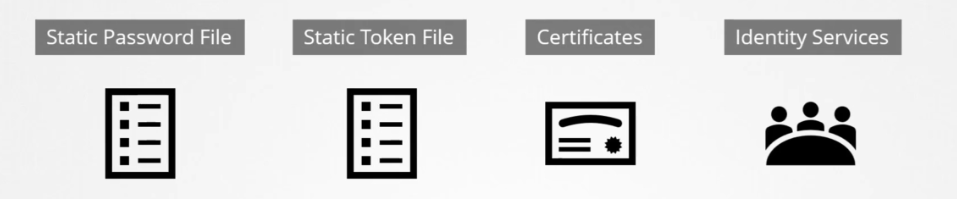
This defines the accounts that can access the API server through various mechanisms:
- Basic authentication (usernames and passwords)
- Bearer tokens (usernames and tokens)
- x509 certificates
- Service accounts
- External providers (e.g., LDAP, OpenID Connect)
Authorization - What can they do?
Once authenticated, Kubernetes determines what actions the account can perform using these mechanisms:
- RBAC Authorization
- ABAC Authorization
- Node Authorization
- Webhook Mode
When you send requests to Kubernetes, you are first authenticated, and then Kubernetes determines if you are authorized to complete the request. Kubernetes supports several Authorization modules.
Accounts
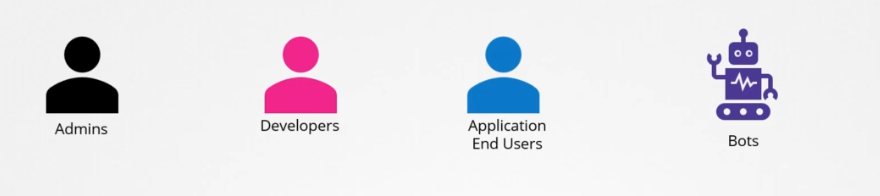
There are two types of accounts in Kubernetes:
- Normal Users: External users managed by services.
- Service Accounts: Used by processes, managed by Kubernetes.
Normal Users
These users are authenticated externally and cannot be created in Kubernetes. User access is managed by the API Server using various authentication methods.
Service Accounts
These accounts represent identities used by processes running in pods and managed by Kubernetes.
Lab: Sending Authenticated Requests to the API Server
Send an authenticated request to the API server to view available API groups. First, get the API server endpoint:
kubectl get endpoints kubernetes | tail -1 | awk '{print "https://" $2}'
Next, use curl to request API server details:
api_endpoint=$(kubectl get endpoints kubernetes | tail -1 | awk '{print "https://" $2}')
sudo curl \
--cacert /etc/kubernetes/pki/ca.crt \
--cert /etc/kubernetes/pki/apiserver-kubelet-client.crt \
--key /etc/kubernetes/pki/apiserver-kubelet-client.key \
$api_endpoint
This will return a list of available API groups like /apis/authorization.k8s.io.
{
  "paths": [
    "/.well-known/openid-configuration",
    "/api",
    "/api/v1",
    "/apis",
    "/apis/",
    "/apis/admissionregistration.k8s.io",
    "/apis/admissionregistration.k8s.io/v1",
    "/apis/apiextensions.k8s.io",
    "/apis/apiextensions.k8s.io/v1",
    "/apis/apiregistration.k8s.io",
    "/apis/apiregistration.k8s.io/v1",
    "/apis/apps",
    "/apis/apps/v1",
    "/apis/authentication.k8s.io",
    "/apis/authentication.k8s.io/v1",
 ....

 (output shortened)
API Server Configuration
To view the API server configuration:
sudo more /etc/kubernetes/manifests/kube-apiserver.yaml
Output:
apiVersion: v1
kind: Pod
metadata:
  annotations:
    kubeadm.kubernetes.io/kube-apiserver.advertise-address.endpoint: 10.0.0.100:6443
  creationTimestamp: null
  labels:
    component: kube-apiserver
    tier: control-plane
  name: kube-apiserver
  namespace: kube-system
spec:
  containers:
  - command:
    - kube-apiserver
    - --advertise-address=10.0.0.100
    - --allow-privileged=true
    - --authorization-mode=Node,RBAC
    - --client-ca-file=/etc/kubernetes/pki/ca.crt
    - --cloud-provider=aws
    - --enable-admission-plugins=NodeRestriction
    - --enable-bootstrap-token-auth=true
    - --etcd-cafile=/etc/kubernetes/pki/etcd/ca.crt

 ....

 (output shortened)
Request for the Authorization API Group
To request the authorization API group:
sudo curl \
--cacert /etc/kubernetes/pki/ca.crt \
--cert /etc/kubernetes/pki/apiserver-kubelet-client.crt \
--key /etc/kubernetes/pki/apiserver-kubelet-client.key \
$api_endpoint/apis/authorization.k8s.io
Sample output:
{
  "kind": "APIGroup",
  "apiVersion": "v1",
  "name": "authorization.k8s.io",
  "versions": [
    {
      "groupVersion": "authorization.k8s.io/v1",
      "version": "v1"
    }
  ],
  "preferredVersion": {
    "groupVersion": "authorization.k8s.io/v1",
    "version": "v1"
  }
}
Request for Core API Group (v1)
To request the core API group:
sudo curl \
--cacert /etc/kubernetes/pki/ca.crt \
--cert /etc/kubernetes/pki/apiserver-kubelet-client.crt \
--key /etc/kubernetes/pki/apiserver-kubelet-client.key \
$api_endpoint/api/v1 \
| more
Sample output:
{
  "kind": "APIResourceList",
  "groupVersion": "v1",
  "resources": [
    {
      "name": "bindings",
      "verbs": ["create"]
    },
    {
      "name": "componentstatuses",
      "verbs": ["get", "list"],
      "shortNames": ["cs"]
    },
    ...
  ]
}
Request for Pods
To list pods across all namespaces:
sudo curl \
--cacert /etc/kubernetes/pki/ca.crt \
--cert /etc/kubernetes/pki/apiserver-kubelet-client.crt \
--key /etc/kubernetes/pki/apiserver-kubelet-client.key \
$api_endpoint/api/v1/pods
The response will show the GET verb used to list pods.