Whitelist Allowed Registries
Overview
To control image source security, we can leverage various options to restrict users from pulling images from unapproved registries.
- Deploy an Admission Webhook Server to validate image names.
- Use an OPA service with policies that enforce registry restrictions.
- Enable the Image Policy Webhook admission controller.
Admission Webhook Server
An Admission Webhook Server can enforce custom policies to block or allow images based on registry sources. By setting up a webhook server:
- Each image name is inspected.
- Trusted registries are specified.
- Users are prevented from pulling unapproved images.
In the kubeconfig file, define the webhook configuration to validate image policies:
## /etc/kubernetes/admission-config.yaml
apiVersion: apiserver.config.k8s.io/v1
kind: AdmissionConfiguration
plugins:
  - name: ImagePolicyWebhook
    configuration:
      imagePolicy:
        kubeConfigFile: /path/to/config/file
        allowTTL: 50
        denyTTL: 50
        retryBackoff: 500
        defaultAllow: true
This config enforces registry restrictions during the admission process.
Open Policy Agent (OPA) for Registry Control
OPA allows you to enforce custom policies for image sources. By writing rules, you can ensure that images come only from trusted registries.
- Create flexible policies for registry restrictions.
- Configure as admission controller to enforce the rules.
An OPA policy could restrict images to specific registries:
package kubernetes.admission

default allow = false

allow {
  input.review.object.spec.containers[_].image == "trusted-registry.io/*"
}
For more information, please see OPA.
Built-In Image Policy Webhook
Kubernetes provides an Image Policy Webhook as a built-in admission controller that allows you to enforce registry controls without external dependencies.
To use the Image Policy Webhook, first enable it in the kube-apiserver configuration:
-
Add
ImagePolicyWebhookto the manifest or service file.# In kube-apiserver manifest or service file--enable-admission-plugins=...,ImagePolicyWebhook,... -
Restart the kube-apiserver to apply changes.
sudo systemctl restart kube-apiserver
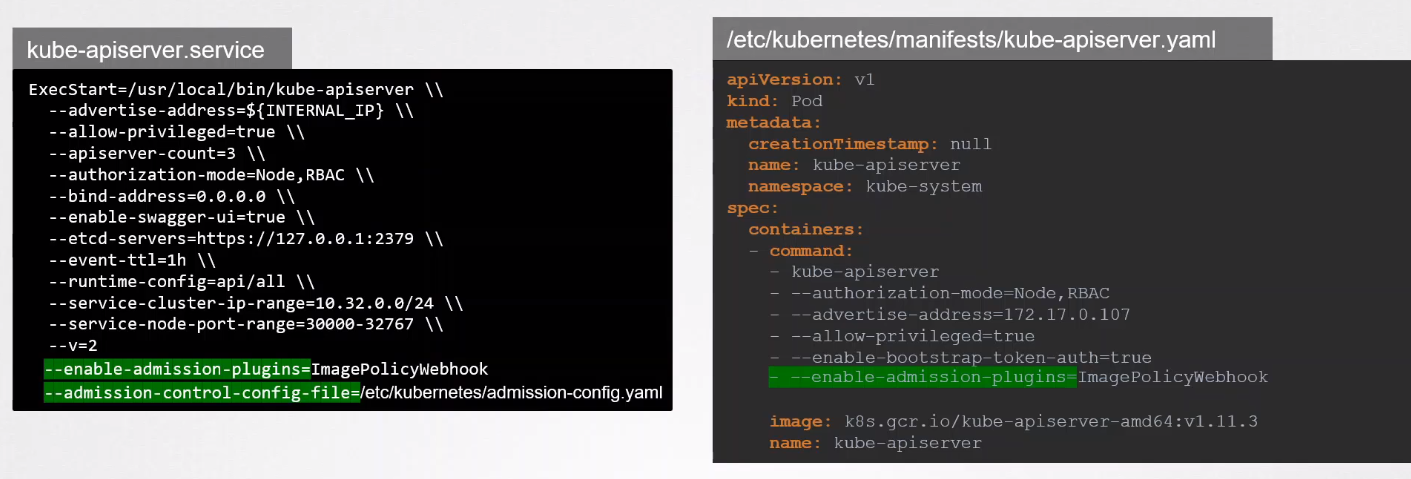
Create an admission config file to specify registry policies and link it in the kube-apiserver configuration:
# Image Policy Webhook config
apiVersion: apiserver.config.k8s.io/v1
kind: AdmissionConfiguration
plugins:
  - name: ImagePolicyWebhook
    configuration:
      imagePolicy:
        kubeConfigFile: /path/to/config/file
        defaultAllow: true