Dynamic Configurations
Overview
Dynamic configuration lets you define how Traefik connects to and manages your services. You do this by adding labels to containers or services.
- Labels are added directly to containers
- Labels define routers, services, and middlewares
- Changes are applied instantly, no restart needed
With dynamic config, you control routing rules and service behavior without editing files or restarting Traefik.
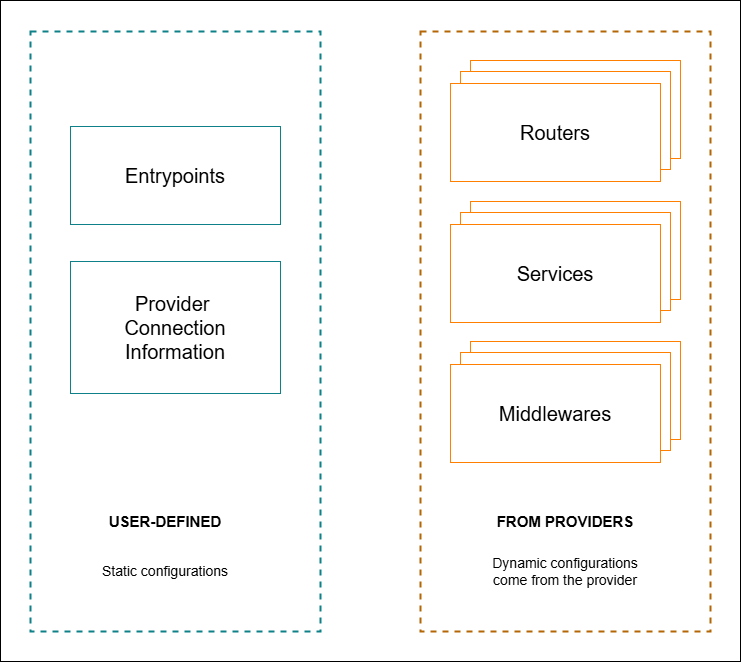
How Dynamic Config Works
Dynamic config is loaded from the provider (like Docker) at runtime.
- Labels tell Traefik what to do with a service
- You can define hostnames, paths, ports, and more
- Labels apply to routers, middlewares, and services
For example, to route traffic based on a path:
labels:
  - "traefik.http.routers.container1.rule=Path(`/first`)"
  - "traefik.http.routers.container2.rule=Path(`/second`)"
  - "traefik.http.routers.container3.rule=Path(`/third`)"
Each container will only respond to its specific path. You can create as many routers as needed using labels.
Enabling Services with Labels
You can also expose a service and set which port it should use:
labels:
  - "traefik.enable=true"
  - "traefik.http.services.myservice.loadbalancer.server.port=5000"
This tells Traefik to route traffic to port 5000 inside the container. You can match the label names to your own container names.
Adding Middleware with Labels
Middlewares are reusable features like redirect, headers, or authentication. You attach them using labels too (covered more later).
labels:
  - "traefik.http.middlewares.myredirect.redirectscheme.scheme=https"
  - "traefik.http.routers.myrouter.middlewares=myredirect"
This example redirects HTTP to HTTPS using middleware attached to a router.