Rate Limiting
Overview
Rate limiting controls how often users can access your content.
- Limits how many requests a user can make in a set time
- Prevents server overload and abuse
- Commonly used for APIs to manage traffic
You can set rules like 50 requests every 100 seconds or 1 request per second. This helps keep your service stable and fair for all users.
How Rate Limiting Works
The middleware calculates the allowed request rate based on settings:
- Average requests allowed per time period
- Time period to count requests (seconds, minutes)
- Rate equals average requests divided by period
You can also customize limits by IP, host, or headers to allow or block certain users.
Lab: Throttling
This lab shows how to use rate limiting to protect your web app or API.
- Set a low request limit so refreshing a few times triggers the limit
- You set limits like "2 requests per second" to prevent abuse
- Observe what happens when the limit is reached
Rate limiting helps keep your platform running smoothly by blocking users who send too many requests too fast.
Clone the Repository
To try out the lab, clone the project repository from GitHub.
- Github repo: joseeden/labs-traefik
Clone and move into the project directory:
git clone https://github.com/joseeden/labs-traefik.git
cd labs-traefik/05-middleware/04-rate-limiting
Project structure:
05-middleware
├── 04-rate-limiting
│   ├── .gitignore
│   ├── docker-compose.ratelimit.yml
│   ├── traefik.yml
│   └── usersfile
Creating Passwords
For this lab, we'll use basic authentication, so we need a safe way to store user passwords. Passwords must be hashed before adding them to the users file.
To create hashed passwords, install the tool htpasswd:
sudo apt install -y apache2-utils
Here are example user credentials. You can change them if you want:
| Username | Password |
|---|---|
| johnsmith | Thr3@tl3u3lw!dN!QHt |
| janedoe | @Ll!$szM3lLiND@h0oD |
Generate a hash with this command:
htpasswd -nb johnsmith 'Thr3@tl3u3lw!dN!QHt'
You should see output like:
johnsmith:$apr1$cipim6NJ$LK11Xtf0t92UvxjKCV8ii0
Do the same for each user.
Next, create a file named usersfile in the same folder as your Docker compose file. Put all hashed credentials here, one user per line:
johnsmith:$apr1$cipim6NJ$LK11Xtf0t92UvxjKCV8ii0
janedoe:$apr1$t65c7tuF$Qscp40RYl.Tq02pUnSv5r1
Add usersfile to your .gitignore file to keep it out of version control:
usersfile
This usersfile will be used in the Docker compose setup next.
Configure the Docker Compose File
In the cloned repository, the docker-compose.ratelimit.yml file shows how the middleware is connected to the router along with others like basicauth and error pages.
This setup limits users to roughly 2 requests per second and blocks any extra requests beyond that.
version: "3"

services:
  traefik:
    image: traefik:v2.3
    ports:
      - "80:80"
      - "443:443"
      - "8080:8080"
    volumes:
      - /var/run/docker.sock:/var/run/docker.sock
      - ./traefik.yml:/etc/traefik/traefik.yml
      - ./usersfile:/usersfile:ro # <-- mount your users file here

  # Catapp service
  catapp:
    image: mikesir87/cats:1.0
    labels:
      - "traefik.enable=true"
      # Routers
      - "traefik.http.routers.catapp.rule=Host(`catapp.localhost`)"
      - "traefik.http.routers.catapp.service=catapp"
      - "traefik.http.routers.catapp.entrypoints=web"
      - "traefik.http.routers.catapp.middlewares=test-auth,test-compress,test-errorpages,test-ratelimit"
      # Services
      - "traefik.http.services.catapp.loadbalancer.server.port=5000"
      # Middleware BasicAuth using usersfile
      - "traefik.http.middlewares.test-auth.basicauth.usersfile=/usersfile"
      # Compress Middleware
      - "traefik.http.middlewares.test-compress.compress=true"
      # Error Pages Middleware
      - "traefik.http.middlewares.test-errorpages.errors.status=400-599"
      - "traefik.http.middlewares.test-errorpages.errors.service=error"
      - "traefik.http.middlewares.test-errorpages.errors.query=/{status}.html"
      # Rate Limit Middleware
      - "traefik.http.middlewares.test-ratelimit.ratelimit.average=2"

  # Error Page service
  error:
    image: guillaumebriday/traefik-custom-error-pages
    labels:
      - "traefik.enable=true"
      - "traefik.http.routers.error.rule=Host(`error.localhost`)"
      - "traefik.http.routers.error.service=error"
      - "traefik.http.services.error.loadbalancer.server.port=80"
      # - traefik.frontend.rule=PathPrefixStrip:/wait
      - "traefik.http.routers.error.entrypoints=web"
Deploy and Test
Deploy the stack with the rate limit config:
docker stack deploy -c docker-compose.ratelimit.yml traefik
Output:
Creating network traefik_default
Creating service traefik_traefik
Creating service traefik_catapp
Creating service traefik_error
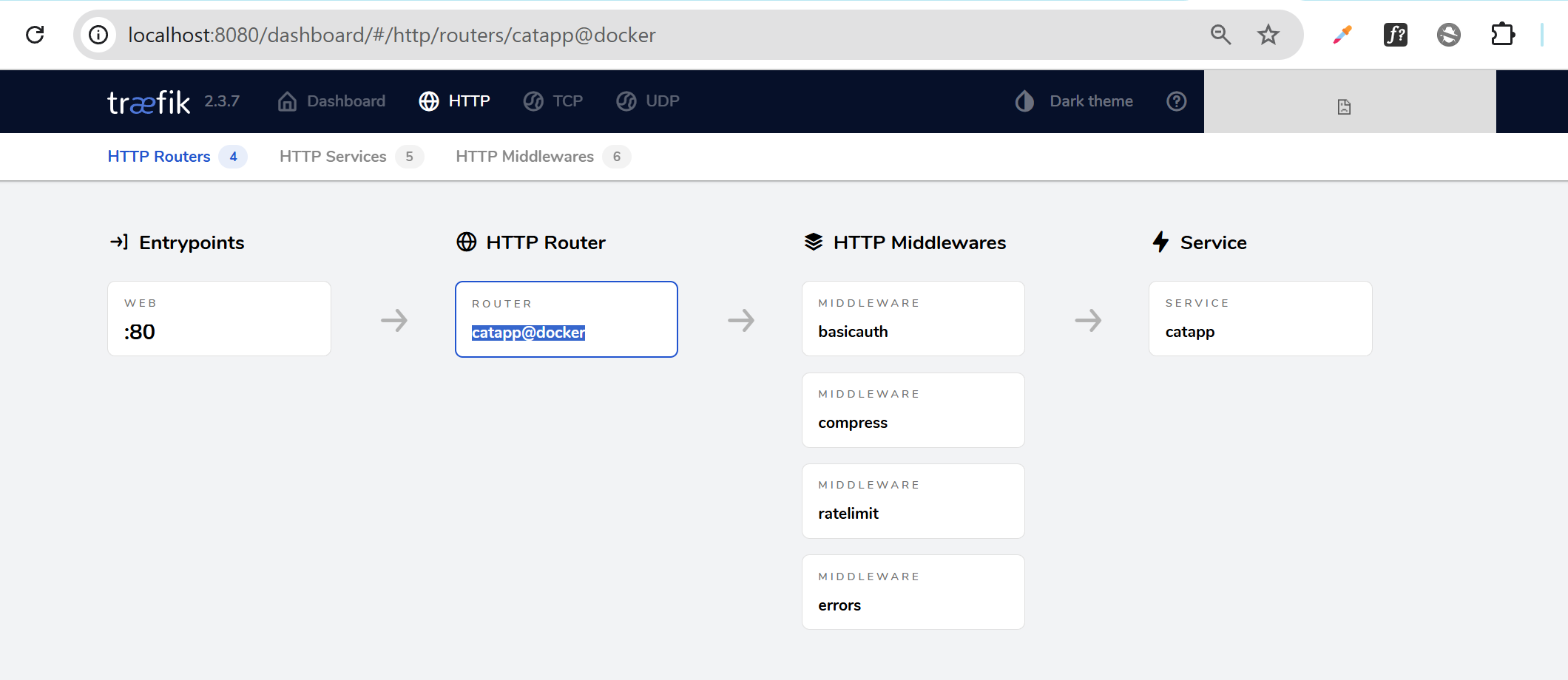
Check the dashboard, go to Routers, and click on catapp@docker. Confirm services and middlewares are running.
http://localhost:8080/
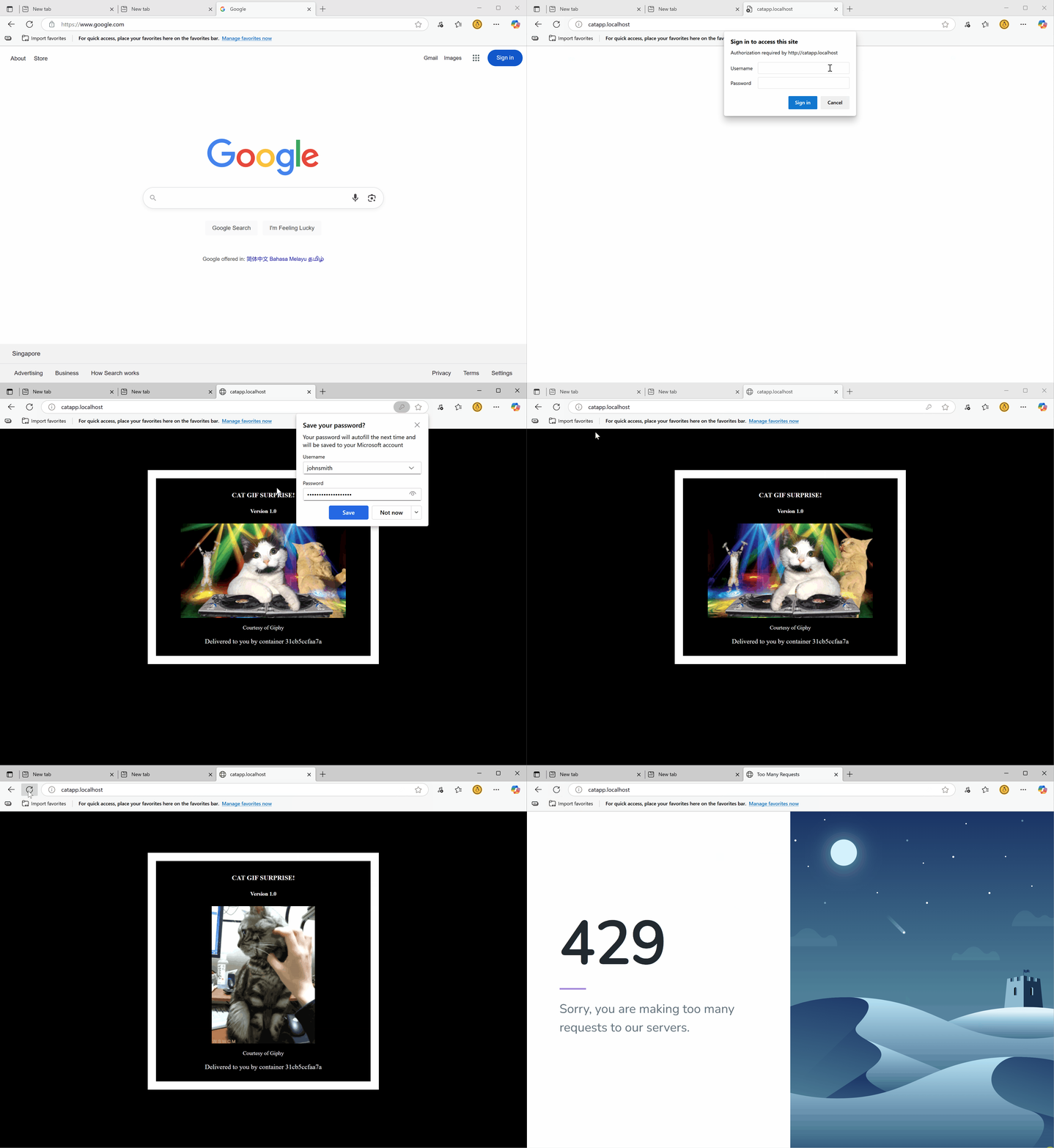
Open your app in a browser, log in, and try refreshing fast. You will see a message blocking too many requests if you refresh too quickly.
http://catapp.localhost/
Cleanup
Delete the deployed stack:
docker stack rm traefik
You can also delete the usersfile:
rm -f usersfile