Connectors
Updated May 26, 2024 ·
Overview
Tableau allows you to connect to various data sources, from local files to cloud databases. You can also save and share connections for easy access later.
Data Connectors
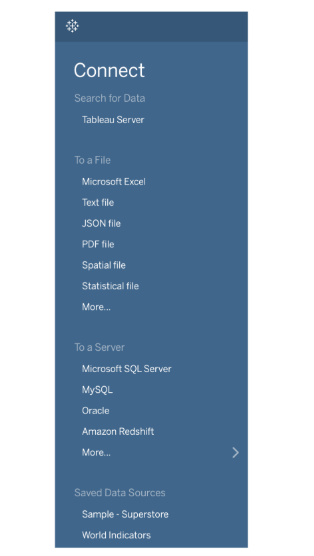
Tableau provides multiple ways to connect to data:
- Tableau Server – Access data from an internal Tableau Server or Tableau Public Online.
- Files – Open Excel, CSV, PDF, and other file types.
- Servers – Connect to databases like SQL Server, MySQL, and more.
- Saved Data Sources – Store frequently used connections for quick access.
More Data Connectors
Tableau supports over 80 data environments, including:
- Cloud Services – Google Sheets, Google Analytics, Snowflake
- Databases – Teradata, PostgreSQL, Oracle
- Other Databases – Use JDBC, ODBC, or Web Data Connector if a direct connector isn't available.
Tableau Desktop vs. Tableau Public
- Tableau Desktop – Supports all data sources but requires a paid license.
- Tableau Public – Limited to files and a few server connections.
Sharing Your Data
Once your data is set up, you can save and share it as a Data Source (.tds file):
- TDS files store connection details and customizations (e.g., calculated fields, filters).
- They don’t contain actual data, just the connection and modifications.
- Tableau Desktop is required to save TDS files (not available in Tableau Public).